EVE-NG images, installed and ready to run
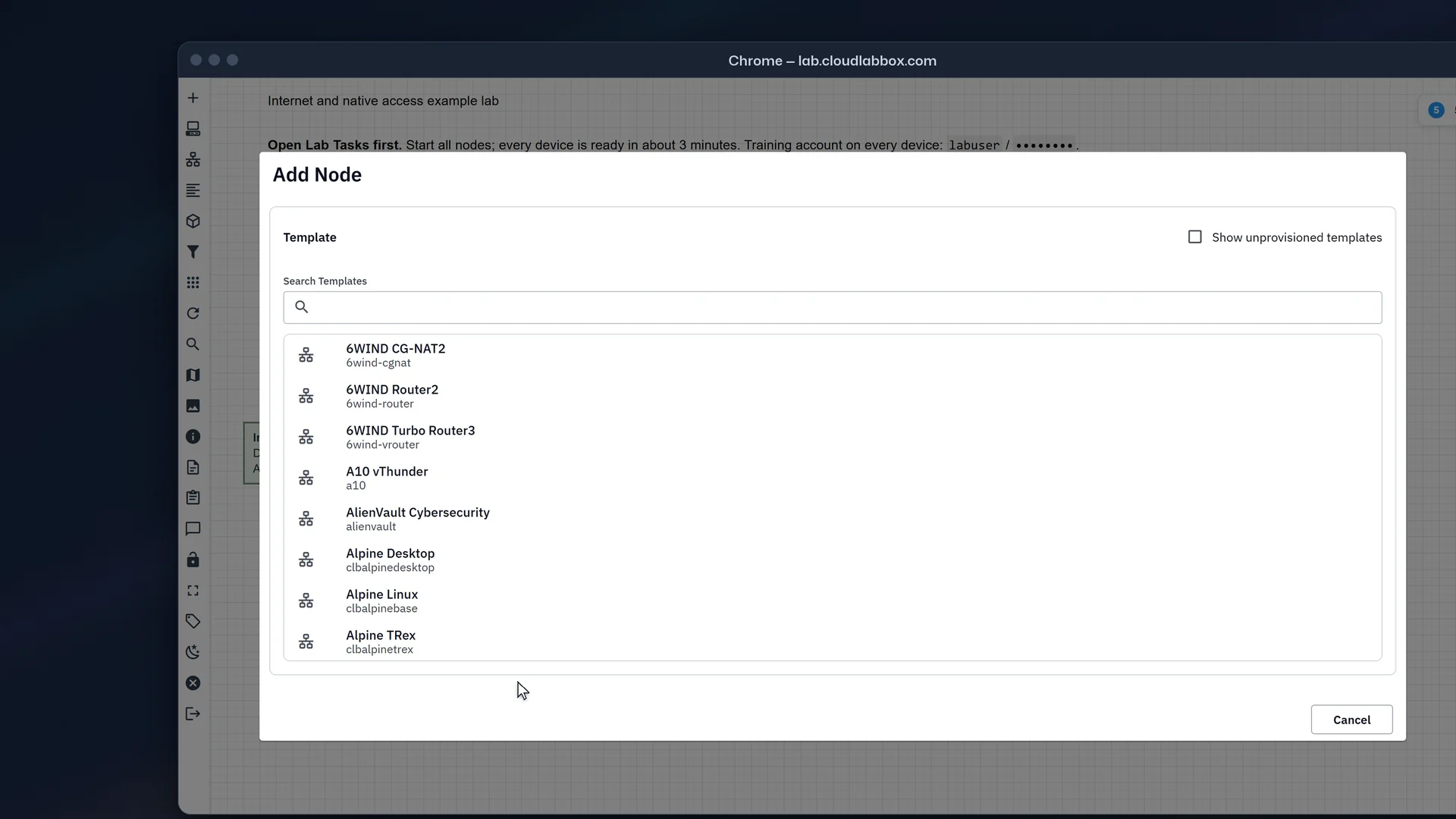
Every CloudLabBox workspace has the same Add Node list: 1,596 images from Cisco, Juniper, Fortinet, Palo Alto and many other vendors. Search for yours, then start it in a lab with nothing to upload.
1,596 images in the Add Node list
IOSvCisco13 images
vios-adventerprisek9-m.spa.159-3.m9vios-adventerprisek9-m.spa.159-3.m8vios-adventerprisek9-m.SPA.159-3.M6vios-adventerprisek9-m.SPA.159-3.M4
vSRXJuniper26 images
vsrxng-24.4R1.9vsrxng-24.2R1-S1.10vsrxng-24.2R1.17vsrxng-23.4R2-S3.9
FortiGateFortinet27 images
fortinet-FGT-v7.0.17.M-build0682fortinet-FGT-v7.0.15.M-build0632fortinet-FGT-v7.0.14.M-build0601fortinet-FGT-v7.0.13.M-build0566
Search needs JavaScript. Here are a few names; browse every image by vendor for the rest.
Browse by vendor
108 products from 64 vendors. 43 have their own page, with installed versions, Add Node settings and tested tips.
Routers 23
-
Catalyst 8000vCisco
c8000v-21 images -
CSR 1000vCisco
csr1000vng-csr1000v-28 images -
IOS XRv 9000Cisco
xrv9k-xrv-24 images -
IOSvCisco
vios-13 images -
huaweiar1k-huaweice6800-huaweice12800-huaweicx-huaweine40e-huaweine40-huaweine5ke-huaweine9k-huaweiusg6kv-15 images -
vJunos-EvolvedJuniper
vjunosevolved-vjunosevoefi-vjunosevo-vjunosevolegacy-8 images -
vjunosrouter-vjunosswitch-6 images -
vMXJuniper
vmxvcp-vmxvfp-vmx-106 images -
vRR and cRPDJuniper
junipervrr-junipercrpd-20 images -
RouterOS (CHR)MikroTik
mikrotik-41 images -
SR OSNokia
timos-ng-timos-timoscpm-ng-timoscpm-timosiom-ng-timosiom-13 images -
VyOSVyOS
vyos-11 images -
Turbo Router, Router and CG-NAT6WIND
6wind-vrouter-6wind-router-6wind-cgnat-22 images -
IOS on Dynamips (1710, 3725, 7206VXR)Cisco
c7200-c3725-c1710-13 images -
ISRvCisco
isrv-6 images -
DANOSDANOS
danos-9 images -
VPPFD.io
vpp-1 image -
Virtual routers and security appliances (VSR1000, vFW1000 and more)H3C
h3cvsr1k-h3cvfw1k-h3cvlb1k-h3cvac1k-h3cvbras1k-h3cvacg1k-h3cserver-32 images -
VSR1000HPE
hpvsr-1 image -
iKuai routeriKuai
ikuai-5 images -
Junos Olive (12.1X46)Juniper
junos-olive-1 image -
TNSRNetgate
tnsr-11 images -
Virtual router and switchRuijie
RG-Ruijieroute-ruijieswitch-Ruijieswitch-4 images
Switches and data centre 12
-
vEOSArista
veos-cvp-66 images -
AOS-CXAruba
arubacx-arubanet-10 images -
Catalyst 9000vCisco
cat9kv-cat9kvq200-cat9kvuadp-6 images -
IOSvL2Cisco
viosl2-7 images -
Nexus 9000vCisco
nxosv9k-titanium-54 images -
OS10Dell
dellos10-14 images -
vQFXJuniper
vqfxre-vqfxpfe-15 images -
Cumulus VXNVIDIA
cumulus-22 images -
ExtremeXOSExtreme Networks
extremexos-9 images -
OcNOSIP Infusion
ocnos-6 images -
PicOSPica8
picos-1 image -
SONiC virtual switchSONiC
sonicsw-3 images
Firewalls and security 30
-
ClearPassAruba
clearpass-5 images -
Security Gateway and ManagementCheck Point
cpsg2-cpsms-cpsg-8 images -
ASAvCisco
asav-asa-46 images -
ISECisco
ise-5 images -
ftd7-fmc7-firepower6-FTD-firepower6-FMC-firepower6-NGIPS-firepower-63 images -
FortiGateFortinet
fortinet-FGT-27 images -
FortiWeb, FortiADC and moreFortinet
fortinet-FWB-fortinet-FAD-fortinet-FAC-fortinet-FNDR-fortinet-mail-22 images -
CloudEdge, vIPS and vADCHillstone
SG6000-hillstone-sg6000-CloudEdge-hillstone-sg6000-vIPS-hillstone-sg6000-vADC-59 images -
vSRXJuniper
vsrxng-vsrx-26 images -
pfSenseNetgate
pfsense-pfSense_plus-13 images -
OPNsenseOPNsense
opnsense-10 images -
VM-Series and PanoramaPalo Alto Networks
paloalto-panorama-24 images -
sophosxg-sophosutm-28 images -
CloudGen Firewall and Control CenterBarracuda
barracuda-6 images -
Context Directory AgentCisco
cda-1 image -
IPS 7 sensor softwareCisco
cips-vIPS-3 images -
Secure ACSCisco
acs-2 images -
Secure Email and Web Manager (SMA)Cisco
zeus-4 images -
Secure Email Gateway (ESA)Cisco
phoebe-4 images -
Secure Network Analytics (Stealthwatch)Cisco
stealth-6 images -
Secure Web Appliance (WSA)Cisco
coeus-11 images -
cOS CoreClavister
clavisterc-4 images -
Cyberoam firewallCyberoam
cyberoam-1 image -
CounterACTForescout
forescout-1 image -
Kerio ControlKerio
kerio-8 images -
Connect Secure and Policy SecurePulse Secure
pulse-6 images -
S-Terra GateS-Terra
sterra-2 images -
NSvSonicWall
sonicwall-7 images -
NG FirewallUntangle
untangle-4 images -
Firebox VWatchGuard
watchguard-11 images
SD-WAN and WAN 8
-
SD-WAN (Viptela)Cisco
vtmgmt-vtmanage-vtsmart-vtbond-vtedge-117 images -
VeloCloud SD-WANVeloCloud
veloedge-velogw-veloorch-27 images -
vWAASCisco
vwaas-3 images -
SD-WAN and SD-WAN CenterCitrix
ctxsdw-clbctxsdwc-12 images -
Session Smart Router (128T)Juniper
128T-1 image -
SteelHead (virtual)Riverbed
riverbed-5 images -
Unity EdgeConnect and OrchestratorSilver Peak
silveredge-silverorch-3 images -
FlexVNF, Director and AnalyticsVersa Networks
versafvnf-versadir-versaana-6 images
Wireless 4
-
aruba-clbarubamm-10 images -
Catalyst 9800-CLCisco
c9800cl-25 images -
vWLCCisco
vwlc-10 images -
Virtual SmartZone (vSZ and vSZ-D)Ruckus
clbvsz6-clbvszd6-4 images
Load balancers 6
-
NetScaler ADC VPXCitrix
nsvpx-28 images -
bigip-bigiq-25 images -
vThunderA10 Networks
a10-11 images -
Virtual ADXBrocade
brocadevadx-1 image -
LoadMasterKemp
kemp-5 images -
Alteon VARadware
alteon-radware-4 images
Management and monitoring 14
-
FortiManager and FortiAnalyzerFortinet
fortinet-FMG-fortinet-FAZ-30 images -
ApstraJuniper
apstra-aos-apstra-ztp-clbapstraflow-19 images -
OSSIMAlienVault
alienvault-1 image -
Data Center Network Manager (DCNM)Cisco
dcnm-3 images -
Nexus DashboardCisco
nd-5 images -
Prime InfrastructureCisco
prime-4 images -
UCS Platform EmulatorCisco
ucspe-2 images -
vNAM (Network Analysis Module)Cisco
vnam-1 image -
NIOS (DNS, DHCP and IPAM)Infoblox
infoblox-3 images -
Junos SpaceJuniper
jspace-13 images -
NagiosNagios
nagios-1 image -
NTM and PanalogPanabit
clbpanabitntm-clbpanalog-4 images -
ScrutinizerPlixer
scrutinizer-2 images -
ZabbixZabbix
zabbix-3 images
Servers and tools 11
-
linux-kali-clbalpinebase-clbalpinedesktop-clbalpinetrex-clbalpinewanem-clbtinycore-openwrt-ccie-jumpserver-47 images -
Android (x86)Android
android-2 images -
TRex traffic generatorCisco
trex-1 image -
Unified Communications ManagerCisco
cucm-6 images -
Docker host (Ubuntu)Docker
dockerserver-1 image -
FreeBSDFreeBSD
freebsd-2 images -
OpenStack (Newton)OpenStack
openstack-1 image -
Ostinato traffic generatorOstinato
ostinato-1 image -
Pi-holePi-hole
pihole-1 image -
TrueNAS CORE, SCALE and FreeNASTrueNAS
clbtruenascore-clbtruenasscale-freenas-3 images -
WANem WAN emulatorWANem
wanem-1 image
No products match. Choose another group or vendor, or search the names above.
From the list to a running node
In your lab at
lab.cloudlabbox.com, open Add Node and choose the template, such asviosorfortinet.Pick the exact name from the Image list, then check CPU and RAM: your plan counts what each running node is set to.
Start the node and click it to open its console in the browser, or right-click it to open it in your own apps.
Licences are yours to bring
CloudLabBox doesn’t provide vendor licences or subscriptions. Use your own licence, or a vendor evaluation where the product offers one. A name containing “Licensed” or “Pre-Licensed-Eval” isn’t an entitlement: check the licence status inside the device.
Labs have no open internet. If an image needs to reach its vendor to activate, request that destination from your Account page; it works once a person approves it.
Find your image in a real workspace
The free demo has the same Add Node list for 30 minutes, with 6 vCPU and 8 GB: enough to find your image and start a small lab with it. No card and no email.
Questions about the images
Is every image here in my workspace?
Yes. Every workspace has the same Add Node list, the 1,596 names in the search on this page, and the free demo shows it too. The list was last refreshed on 14 October 2026.
Has every image been tested?
No. Being on the list doesn’t mean an image has been tested. The 65 node tips, updated 9 October 2026, say exactly which images were started and what each check reached, and the product pages mark those names.
How many nodes can I run at once?
As many as your plan’s vCPU and RAM allow. EVE-NG admits each node by the CPU and RAM set on it, so add up the nodes you’ll run at the same time and pick the plan that covers them.
Can I import a .unl lab that uses these images?
Yes. Its image names must match names on this list exactly, so edit any that don’t before you import it.
Can I download the images?
No. The images run only inside your CloudLabBox workspace.
CloudLabBox is independent of the vendors named on this page. Their names identify the images in the workspace’s Add Node list.